How do I verify my child's age?
Age-group events need a date of birth confirmed by the government. This takes a few minutes with DigiLocker.
The short answer
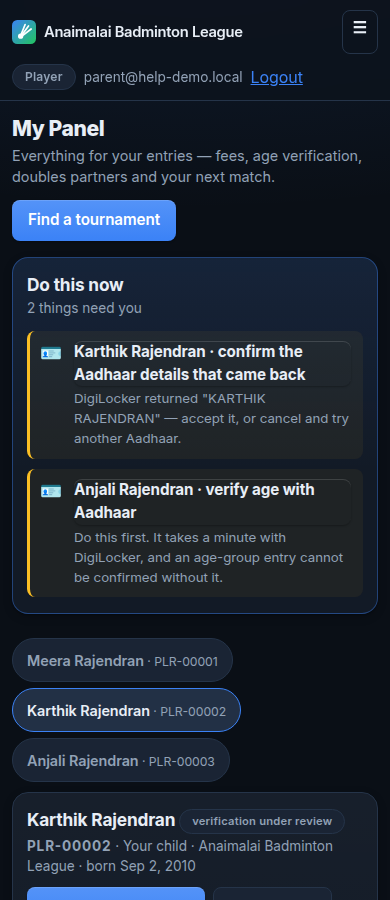
Sign in, open My Panel, and choose the player. Press Verify age.
You will be sent to DigiLocker, which is a government website. Sign in there as the player whose age you are verifying, and approve the request.
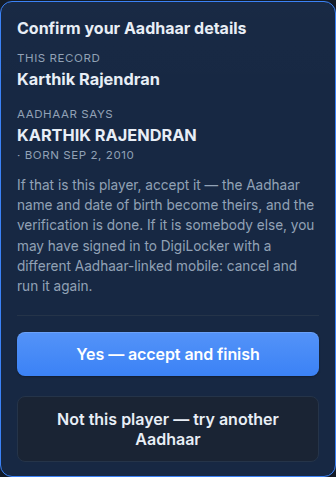
You come back to this site. One step is left: check the name and date of birth that came back, and accept them. The verification is not finished until you accept.
We receive only the confirmed name and date of birth. We never receive the Aadhaar number.
Step by step
Open My Panel and choose the player you want to verify.
One account can hold several players. Each one is verified separately.
Press Verify age. Read the warning about the Mobile tab before you continue.
This is the step where most mistakes happen. The warning is short and it matters.
Answer whether this player already has a DigiLocker account.
If you are not sure, choose Yes. DigiLocker will tell you if no account exists, and offers a sign-up link on that page.
On DigiLocker, sign in as the player. Do not use the Mobile tab. Choose Username or Other ID.
The Mobile tab signs in whoever owns the phone number, which is usually the parent.
Approve the request. DigiLocker sends you back to this site.
Check the name and date of birth that came back. If they belong to this player, accept them.
If they belong to somebody else, choose Not this player and start again with the correct account.


Things that go wrong
Do not use the Mobile tab
DigiLocker's Mobile tab signs in the person who owns the phone number. If you use it while verifying your child, the government returns your name and your date of birth, and they are saved onto your child's record. Nothing appears to go wrong. Use Username or Other ID and sign in as the player instead.
One Aadhaar can verify only one player
If you have three children, you cannot use your own Aadhaar for all three. Each player needs their own Aadhaar. This is what stops one person being registered as several players.
One phone number can hold up to five DigiLocker accounts
A whole family can share one mobile number. When a number has more than one account, DigiLocker shows you a list. Choose the account belonging to the player you are verifying.
The government step is not the last step
After DigiLocker sends you back, the name and date of birth are waiting for you to check. Until you accept them, the player is not verified. Many people stop here believing they have finished.
The player's Aadhaar needs a mobile number linked to it
The one-time password goes to the mobile number linked to that Aadhaar at UIDAI. If no number is linked, no online route can confirm that age. You will need to link one first.
Only a verified DigiLocker account can confirm an age
A DigiLocker account marked Verified has an Aadhaar behind it. An unverified account cannot confirm anybody's date of birth.